
Creating a Property File
You can create a property file with customized configurations other than the default
demo.properties file.
Procedure
-
Go to the
Filemenu and click New Property File. -
To configure the Property file, specify the values in the file.
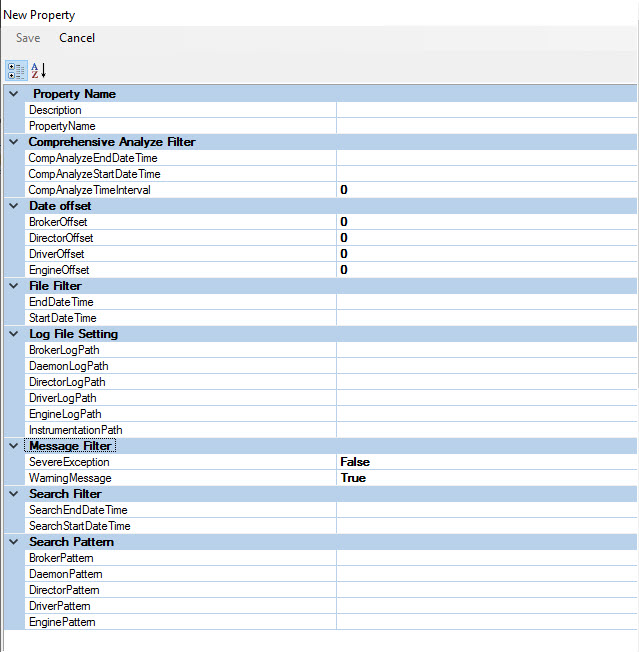
Property File Configuration Parameters
| Field | Sub-Fields | Description |
|---|---|---|
| Property Name | Property Name | It specifies the name of the Property file. |
| Description | It gives the description of the Property file. It is mandatory and saved to the config directory. | |
| Comprehensive Analyze Filter | CompAnalyzeStartDate Time | It specifies the Start date and time for the Comprehensive Analyze. |
| CompAnalyzeEndDate Time | It specifies the Start date and time for the Comprehensive Analyze. | |
| CompAnalyzeTimeInterval | It specifies the time (in seconds) between the Start time and End time of the Comprehensive Analyze. | |
| Date Offset | Driver Offset | It specifies the offset(in hours) of the Driver log file. For example, if it is -1, one hour is reduced from the Driver log file. |
| Broker Offset | It specifies the offset (in hours) of the Broker log file. For example, if it is 2, two hours are added in the Broker log file. | |
| Engine Offset | It specifies the offset (in hours) of the Engine log file. For example, if it is 2, two hours are added in the Engine log file. | |
| Director Offset | It specifies the offset (in hours) of the Engine log file. For example, if it is 2, two hours are added in the Director log file. | |
| File Filter | StartDate Time | It specifies the start date and time to parse the log files. |
| EndDate Time | It specifies the end date and time to parse the log files. | |
| Log Culture Name and Date Time Format | Log Date Time Format | It specifies the date and time format for the log file. |
| Log File Setting | DriverLogPath | It specifies the root path of the Driver Log file. |
| BrokerLogPath | It specifies the root path of the Broker Log file. | |
| DirectorLogPath | It specifies the root path of the Director Log file. | |
| DaemonLogPath | It specifies the root path of the Daemon Log file. | |
| EngineLogPath | It specifies the root path of the Engine Log file. | |
| InstrumentationPath | It specifies the file path of the Instrumentation Log file. | |
| Message Filter | Warning Message | It specifies the boolean value, either True or False. If the value is set to True, then the warnings messages without an exception is included in the analyzed result of the log file. Otherwise, the warning messages are ignored. |
| Severe Exception | It specifies to display only when there is a Severe error or an exception. | |
| Search Filter | Search StartDate Time | It specifies the start date and time to reanalyze the logs. |
| Search EndDate Time | It specifies the end date and time to reanalyze the logs. | |
| Search Pattern | Driver Pattern | It specifies the search pattern in the Driver log file. For example, driver*.log |
| Broker Pattern | It specifies the search pattern in the Broker log file. For example, gridserver.03.29.2022-*.log | |
| Engine Pattern | It specifies the search pattern in the Engine log file. For example, engine-*.03.29.2022*.log | |
| Daemon Pattern | It specifies the search pattern in the Daemon log file. For example, engine*.log | |
| Director Pattern | It specifies the search pattern in the Director log file. For example, engine*.log |
-
To save the configuration of the Property file, click Save.
-
To analyze the logs, click Run Analyze
 .
Note: To abort the run, click Abort Analyze  .
.
Related information