
Engine and Daemon Logs
Each Engine and Engine Daemon generate their own logs. These logs can be accessed directly on Engines. However, because Engines are typically installed in several different machines, there are ways to view logs remotely from other computers. The following procedures describe how to read Engine logs.
To view log files directly, look in the following directories in each Engine install directory:
-
Engine instance logs: install-dir
/work/machine name-instance/log/* -
Engine Daemon logs: install-dir
/profiles/machine name/logs/engined.log -
Also examine other
.logfiles in the Engine tree.
To read a remote Engine log in a scrolling window
-
Go to Grid Components > Engines > Engine Admin.
-
Select an Engine.
-
From the Actions list, select Remote Log.This opens a window that displays the log for the Engine. Logging information is displayed as it is generated. This does not, however, display any prior logging history.
To access previous logs remotely
-
Go to Engines > Engine Admin.
-
Select an Engine.
-
From the Actions list, select Log Files.
-
A window opens with a list of links for each of the logs residing on that Engine. The links are displayed by date and time. You can do any one of the following actions:
-
Select an Engine Daemon or a particular Engine from the list in the upper left. This shows all of the log files on that Engine Daemon or Engine and their sizes. You can also type in the list box to filter the list to partial matches quickly.
-
Click a log file name and its content is displayed to the right in the window.
-
Click the links in the upper right to download a ZIP archive of all log files on the host, a ZIP archive of all log files of an Engine Daemon or Engine instance, or a particular log file.
-
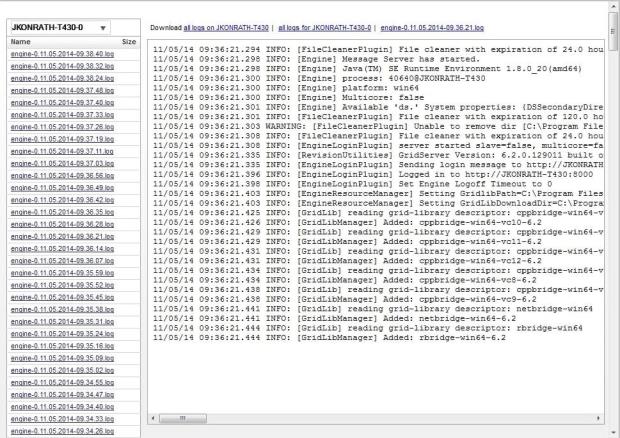
The Log Files window
You change the log level for Engines in Engine configurations, in the Log section. You can also set other logging options in Engine configurations, such as the maximum log size, and when log files are automatically cleaned.