
Event Streaming by Using Apache Kafka
Event streaming exposes the internal events that are generated in GridServer so that users can use the information for purposes such as monitoring. You can stream component-wise events by using Apache Kafka Message framework.
Related information
Configuring Event Streaming
Prerequisites
-
You must have Apache Kafka running.
-
GridServer Manager must be up and running.
Procedure
-
Log in to the GridServer Administration Tool with an account that has a Security Role with the Manager Configuration Edit feature enabled.
-
Go to Admin > System Admin > Manager Configuration > Services > Event Streaming.
-
On the Director, configure the values in the Event Streaming section. You can configure Kafka settings on the Primary and the Secondary Director. \
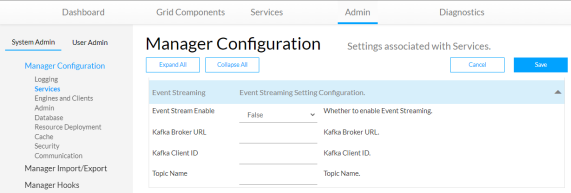 Manager ConfigurationRefer the following table to configure the Manager:\
Property Value Event Stream Enable Whether to enable event streaming. If it is set to True, you must also set theKafka Broker URL,Kafka Client ID, andTopic Nameproperties.Kafka Broker URL Kafka Broker URL. The URL format must be: Kafka installed Machine HostName:Port Number.Kafka Client ID ID of the Kafka Client If you use event streaming, the Kafka Client ID value is appended with _Brokerfor a Broker and_Directorfor a Director. For example, if you enter the Kafka Client ID asGrid_Client, it is appended as follows: For Broker:Grid_Client_BrokerFor Director:Grid_Client_DirectorTopic Name Name of the topic -
Click Save.
Events Captured by Apache Kafka
The following events are captured by using Apache Kafka for GridServer:
| Events | Description |
|---|---|
| Broker Added | Broker is added to the Director |
| Broker Removed | Broker is removed from the Director |
| Driver Added | Driver is added to the Broker |
| Driver Removed | Driver is removed from the Broker |
| Engine Added | Engine is added to the Broker |
| Engine Blacklisted | Engine is blacklisted |
| Engine Daemon Added | Engine Daemon is added to the Director |
| Engine Daemon Removed | Engine Daemon is removed from the Director |
| Engine Died | Engine dies (did not log off properly) |
| Engine Greylisted | Engine is greylisted |
| Engine Removed | Engine is removed from the Broker |
| Memory Warning | Server exceeds the configured threshold of memory usage |
| Service Session Cancelled | Service session is cancelled |
| Service Session Completed | Service session is completed |
| Service Session Started | Service session starts |
| Task Assigned | Task is assigned to an Engine |
| Task Completed | Task is completed |
| Task Error | Task fails |
| Task Submitted | Task is submitted to the Broker |
Note:
These events are recorded in the log file generated over Apache Kafka. You can also specify a custom log directory in the
server.properties file of Apache Kafka. To capture streamed events, write your own consumer code.